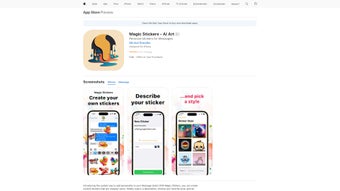

Download Magic iMessage Stickers – AI‑powered custom sticker creator for iPhone
Overview
Magic iMessage Stickers is a cutting‑edge web‑based application that turns ordinary iMessage chats into vibrant visual conversations. By harnessing artificial‑intelligence technology, the tool lets iPhone users generate fully personalized stickers from simple text prompts. Whether you crave a playful pixel‑art character, a sleek neon sign, a realistic 3D object, or a hand‑drawn watercolor illustration, the app’s expansive style library makes it possible to craft a sticker that mirrors your personality and the tone of the conversation.
The platform is completely free to download, operates securely within the iOS ecosystem, and requires no prior design experience. With iOS 16.1 or later, you can start creating, sharing, and saving unique stickers directly from your device, adding a fresh layer of expression to every message you send. In addition to its creative capabilities, Magic iMessage Stickers respects user privacy by transmitting prompt data over encrypted channels and never storing personal identifiers beyond what is necessary for the AI generation process.
Regular updates introduce new artistic filters, performance improvements, and occasional seasonal style packs, ensuring that the app remains a dynamic and evolving tool for visual communication.
Key Features & Creative Possibilities
- AI‑driven sticker generation: Turn a single line of text into a high‑resolution PNG sticker in seconds.
- Multiple artistic styles: Choose from 3D objects, pixel art, papercut, neon signs, watercolor, sketch, comic‑book, and more.
- Instant preview & edit: View a real‑time preview and adjust prompts for perfect results.
- One‑tap sharing: Export stickers directly to iMessage, Photos, or other apps without leaving the interface.
- Free core functionality: All basic features are free; optional in‑app purchases unlock premium style packs and higher‑resolution outputs.
- Privacy‑first design: No personal data is stored beyond the generated sticker; the app complies with Apple’s privacy guidelines.
- Regular updates: New artistic filters and performance improvements are rolled out automatically.
- Sticker library integration: Saved stickers appear in the native iMessage sticker picker for seamless drag‑and‑drop usage.
- Cloud‑based processing: Heavy AI computation runs on secure servers, preserving battery life on the device.
- Offline cache: Recently generated stickers are cached locally, allowing offline reuse.
The feature set is deliberately streamlined to keep the user experience frictionless. For instance, the AI engine runs on secure cloud servers, meaning the heavy lifting happens off‑device, preserving battery life while delivering consistent quality across all iPhone models. The style selector is presented as a visual gallery, allowing you to quickly scroll through thumbnails and pick the aesthetic that best fits your message.
Moreover, the app integrates with the native iMessage sticker picker, so once a sticker is saved, it behaves like any other built‑in sticker—ready for drag‑and‑drop or quick tap insertion. This seamless integration ensures that the creative workflow stays within the messaging environment, eliminating the need for external editors or complicated file‑management steps. The combination of a robust AI backend, an intuitive front‑end, and strict privacy safeguards makes Magic iMessage Stickers a compelling choice for anyone looking to personalize their chats without learning complex design software.
Installation, Setup & Daily Use
Getting started with Magic iMessage Stickers is straightforward. First, open the App Store on your iPhone and search for “Magic iMessage Stickers.” Tap Get and confirm the download using Face ID, Touch ID, or your Apple ID password. The app size is under 30 MB, making it quick to download even on slower connections. Once installed, launch the app; the onboarding screen greets you with a brief tutorial that explains how to write prompts, choose styles, and share results. The tutorial also highlights accessibility options such as larger text for prompts and voice‑over compatibility, ensuring that users with different needs can benefit from the tool.
The core workflow consists of three simple steps:
- Enter a description: Type a concise phrase such as “a smiling avocado wearing sunglasses” or “retro neon arcade sign.” The AI understands natural language and can interpret adjectives, colors, and composition cues.
- Select a style: Swipe through the style carousel—pick “Pixel Art” for a nostalgic 8‑bit vibe, “Papercut” for a handcrafted look, “Neon” for a glowing, futuristic feel, or “Watercolor” for a soft, painterly effect.
- Generate & share: Press the Create button. Within 5‑10 seconds, the AI returns a polished PNG sticker. Tap Save to Stickers to add it to your iMessage sticker library, or use Share to send it instantly in a conversation.
The app also includes a Favorites tab where you can store your most used stickers for quick access, and a History log that records previous prompts, making it easy to recreate a favorite design. For power users, the settings menu offers options to enable high‑resolution output (available via a modest in‑app purchase) and to toggle analytics sharing—ensuring you retain control over data collection. Because the generation process occurs in the cloud, an active internet connection is required. However, the app caches recent stickers locally, allowing you to resend them even when offline. This hybrid approach balances performance with convenience, ensuring you can keep the conversation flowing without waiting for a new network request each time.
Advanced users can also experiment with “prompt chaining,” a technique where you generate a base sticker and then feed the resulting description back into the AI with additional modifiers. This allows for iterative refinement, creating complex compositions such as layered collages or multi‑character scenes. The app’s UI provides a “copy prompt” button that makes this workflow seamless, encouraging creativity while keeping the process simple enough for casual users.
Compatibility, Pros, Cons & Frequently Asked Questions
Compatibility: Magic iMessage Stickers runs on iOS 16.1 and later. It is optimized for iPhone models from iPhone 8 onward, including the latest iPhone 15 series. The app is not available for Android, macOS, or Windows, as it relies on Apple’s iMessage infrastructure for sticker integration. Tablet users with iPadOS 16.1 can also install the app, though the UI is primarily designed for the iPhone screen size.
Pros
- Intuitive interface—no design skills required.
- Fast AI generation with diverse artistic styles.
- Seamless iMessage integration—stickers behave like native assets.
- Free core functionality with optional premium upgrades.
- Strong privacy stance; minimal data retention.
- Offline cache for quick reuse of recent stickers.
- Regular updates introduce fresh styles and performance tweaks.
Cons
- Requires iOS 16.1 or newer—older devices are unsupported.
- Premium styles and high‑resolution outputs are behind a paywall.
- Cloud‑based generation means you need an internet connection for new stickers.
- Currently limited to iPhone and iPad; no Android or desktop version.
- Limited export formats—currently PNG only.
FAQ – Frequently Asked Questions
Is Magic iMessage Stickers completely free?
The core sticker‑creation engine is free. You can generate an unlimited number of stickers using the built‑in styles at no cost. Optional in‑app purchases unlock premium style packs and higher‑resolution outputs for users who want extra polish.
Do I need an Apple ID to use the app?
Yes, because Magic iMessage Stickers is distributed through the Apple App Store. Your Apple ID is only used for the initial download and any optional purchases; the app itself does not store or share personal identifiers beyond what is required for iMessage sticker integration.
Can I use the stickers outside of iMessage?
Absolutely. After generating a sticker, you can save it to your Photos library or share it directly to other apps such as WhatsApp, Instagram, or Snapchat using the standard iOS share sheet.
How does the app handle my privacy?
Magic iMessage Stickers follows Apple’s privacy guidelines. Prompt text is transmitted securely to the AI server for processing and is not stored long‑term. No personal data, such as contacts or message content, is accessed or retained by the app.
What should I do if a generated sticker looks off‑brand or contains errors?
Because the AI interprets natural language, ambiguous prompts can produce unexpected results. Try refining the description—add more detail about colors, perspective, or style. If you encounter a technical glitch, restarting the app or checking for an update usually resolves the issue.
Conclusion & Call to Action
Magic iMessage Stickers fills a niche that many iMessage users didn’t even know they had: the ability to personalize their chat experience with AI‑crafted visual content, all without leaving the messaging app. The combination of an intuitive interface, a rich library of artistic styles, and seamless integration with iMessage makes it a compelling addition to any iPhone user’s toolkit. While the requirement for iOS 16.1+ and the reliance on an internet connection may limit adoption among legacy device owners, the benefits—especially the creative freedom and time‑saving convenience—far outweigh these constraints for the majority of modern iPhone users.
If you’re ready to inject fresh personality into your conversations, simply head to the App Store, download Magic iMessage Stickers, and start generating stickers that speak louder than words. Whether you’re looking to impress friends, add flair to business chats, or simply enjoy a new way to express yourself, this free app offers a secure, regularly updated platform that grows with your imagination. Download Magic iMessage Stickers today and turn every message into a masterpiece.
Magic iMessage Stickers delivers an impressive AI‑driven experience for iMessage users. The interface is intuitive, the style variety is extensive, and the free core features are generous. Minor drawbacks include the iOS 16.1 requirement and the need for an internet connection, but overall it’s a standout tool for personalizing chats.
Review Pros
- Fast, high‑quality sticker generation.
- Seamless integration with native iMessage picker.
- Wide range of artistic styles.
- Free core functionality.
- Strong privacy protections.
Review Cons
- Premium styles behind a paywall.
- Requires iOS 16.1 or newer.
- Cloud processing needs internet.
- No Android or desktop version.



.png)



